Invalidate Cache using Service Hooks
sitefinity | 2026-02-20
🚩 Problem Overview
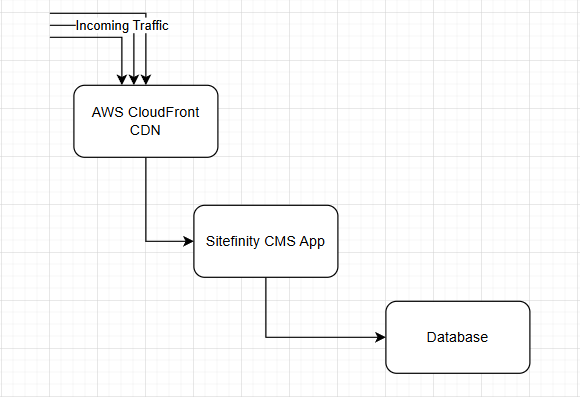
In our Sitefinity project, we are hosting the application on AWS services and the instance is with CloudFront CDN.
Whenever we want to purge the cache, we either wait for it to invalidate or logon to AWS CloudFront portal to execute the invalidation.
💡 The Solution
Sitefinity provides a built-in service hooks that exactly what we looking for.
Why?
It support listen to page is changed event, and perform a hook call.
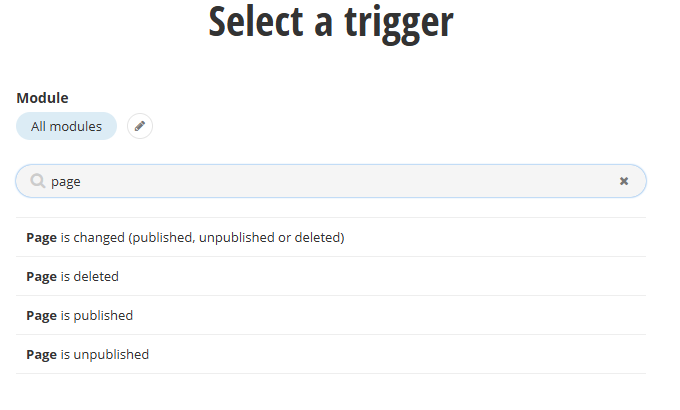
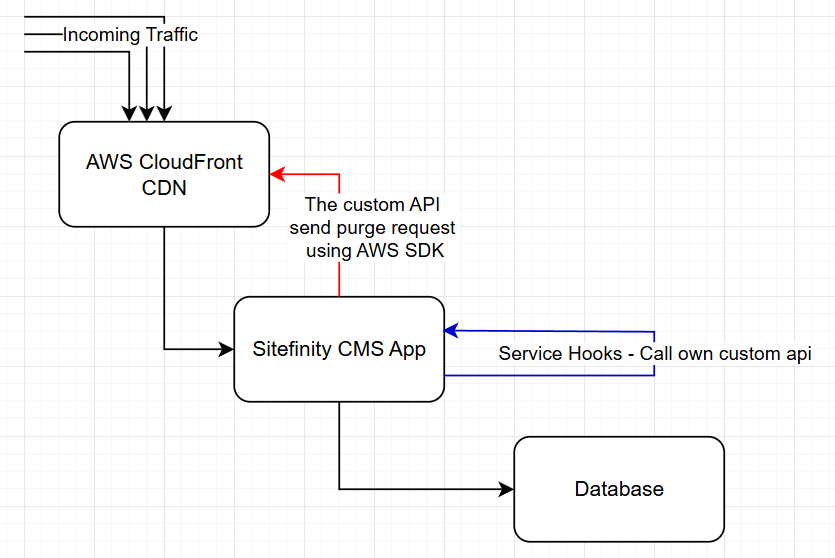
In our project, we need a customize api endpoint to listen the hook call and send the request using AWS SDK.
This is because AWS CloudFront does not allow redirect REST API interaction and it does not understand the query directly from Sitefinity Service Hooks.
For other CDN service, it is worth to explore whether it can take understand the request directlyly from the service hooks.
In addition, we will have an auth header, using Authorization bearer token to validate the hooks call in our api, to prevent any unwanted incoming request.
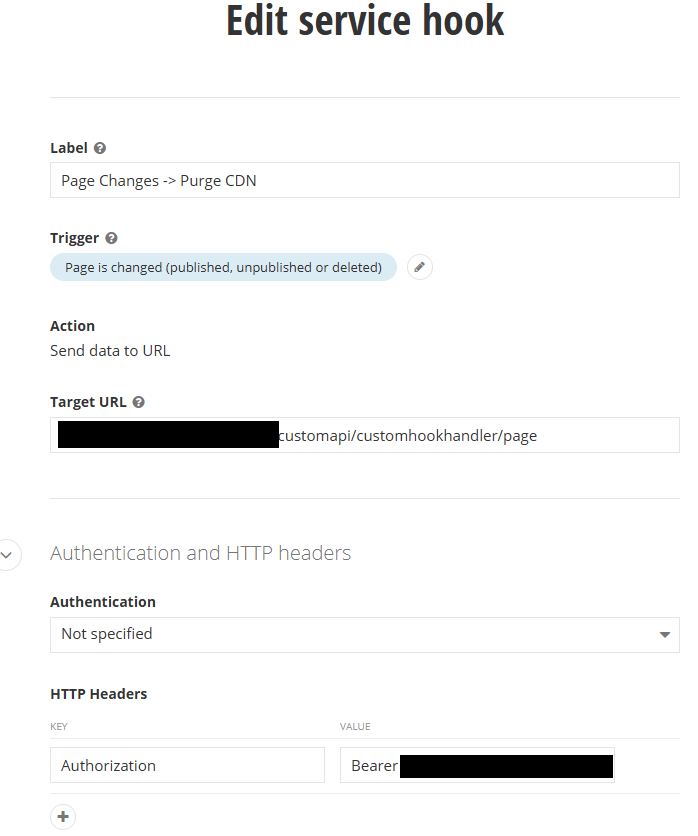
The key can stored in the CMS advanced setting / offline.
🔗 The Solution Code Snippets:
The API Controller
[CustomHookToken]
[RoutePrefix("customapi/customhookhandler")]
public class CustomHookHandlerController : ApiController
{
    [HttpPost]
    [Route("page")]
    public IHttpActionResult Page(CustomHookHandlerModel model)
    {
        var error = "";
        try
        {
            if (!string.IsNullOrEmpty(model.Item.Id))
            {
                // In here we handle Updated and Deleted event only
                if (model.OriginalEvent.Action == "Updated" || model.OriginalEvent.Action == "Deleted")
                {
                    var pageId = new Guid(model.Item.Id);
                    var pageService = PageManager.GetManager();
                    var pageNode = pageService.GetPageNodes().Where(x => x.Id == pageId).FirstOrDefault();

                    if (pageNode != null)
                    {
                        // get all paths of the page setup
                        var paths = pageNode.Urls.Select(x => x.Url.TrimStart('~')).ToList();
                        paths.Add("/" + pageNode.UrlName.ToString());

                        // MyConfig have the AWS IAM user for accesskey, accesskey secret, and also the cloudfront distribution id
                        var cfConfig = Config.Get<MyConfig>();
                        var client = new AmazonCloudFrontClient(cfConfig.AccessKeyId, cfConfig.AccessKey, RegionEndpoint.APSoutheast1);
                        var batch = new InvalidationBatch()
                        {
                            // Set it to now, or earlier datetime.
                            CallerReference = DateTime.Now.ToString("ddMMyyyyHHmmss"),
                            Paths = new Paths() { Items = paths, Quantity = paths.Count },
                        };
                        var request = new CreateInvalidationRequest(cfConfig.DistributionId, batch);
                        client.CreateInvalidation(request);
                    }
                }
            }
        }
        catch (Exception ex)
        {
            return Content(HttpStatusCode.BadRequest, new
            {
                ex.Message
            });
        }

        return Content(HttpStatusCode.OK, error);
    }
}
The Authorization Filter Attribute
public class CustomHookTokenAttribute : AuthorizationFilterAttribute
{
    public override void OnAuthorization(HttpActionContext actionContext)
    {
        var headers = actionContext.Request.Headers;

        if (headers.Authorization == null || headers.Authorization.Scheme != "Bearer" || string.IsNullOrEmpty(headers.Authorization.Parameter))
        {
            actionContext.Response = actionContext.Request.CreateResponse(HttpStatusCode.BadRequest, new
            {
                Message = "Unauthorized request."
            });
            return;
        }

        var token = headers.Authorization.Parameter;

        // Optionally: validate the token here
        if (!IsValidToken(token))
        {
            actionContext.Response = actionContext.Request.CreateResponse(HttpStatusCode.BadRequest, new
            {
                Message = "Unauthorized request."
            });
        }
    }

    private bool IsValidToken(string token)
    {
        var authToken = Config.Get<MyConfig>().CustomHookToken;
        return token == authToken;
    }
}
Lastly the solution will be looking like this:
📌 Potential Enhancements
Besides pages, handling of the custom content type service hooks and in multisite environments are worth to explore too.
With Service Hooks, it has many possibility to do data exchange and integration with other systems.